HP Chromebook 15.6 Inch Information
-
-
:fontawesome-solid-computer:{ .lg .middle } Guide Resources
- :fontawesome-solid-computer: System Specifications
- :fontawesome-solid-diagram-successor: Chargers and Accessories
:material-store:{ .lg .middle } Purchase Options
:material-book-open:{ .lg .middle } ChromeOS Guide Books
Incomplete Device
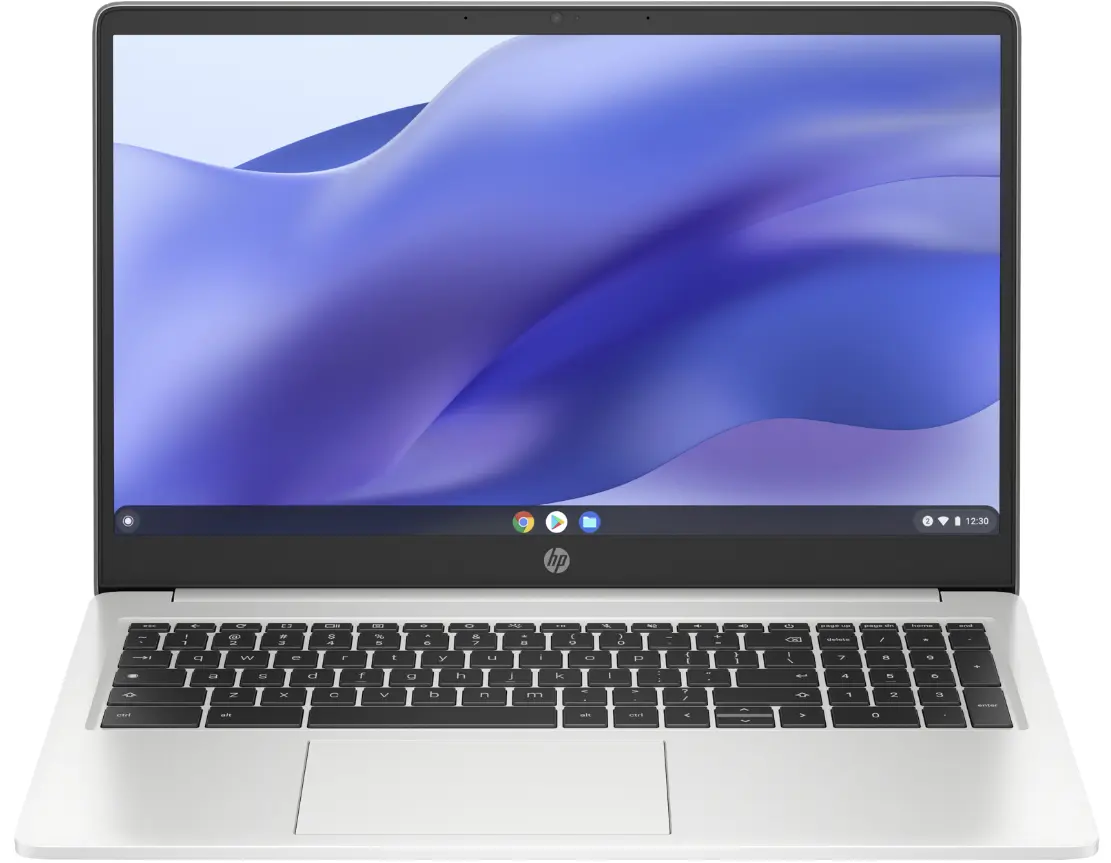
The ChromeOS Guide for the HP Chromebook 15.6 Inch is currently incomplete, as our database does not contain the complete details for this Chromebook. This means that items such as product images, features and port arrangements may be missing from our product listing. We have partially published information that is known to us and will work to resolve this as soon as possible.
The HP Chromebook 15.6 Inch is a budget-friendly option for users looking for a reliable and versatile device that balances performance with affordability. With a 15.6-inch display, this model provides ample screen space for both work and entertainment, making it ideal for students, remote workers, or casual users who need a lightweight solution for everyday tasks. Powered by an Intel Celeron N4500 processor and equipped with 4 GB of RAM, the device is capable of handling modern web applications smoothly while offering enough power to run Android apps and Linux applications thanks to its x86_64 architecture and supported features. Its 32 GB eMMC storage ensures a balance between performance and capacity for basic file storage and app installation.
Priced at $209, the HP Chromebook 15.6 Inch delivers value without compromising on essential functionality. It includes multiple connectivity options such as HDMI, USB-A, and a USB Type-C port with video output support, making it easy to connect peripherals or external displays when needed. The device also features a headphone/microphone combo jack for audio convenience, along with a Kensington lock slot for added security. While it lacks an optional touchscreen, the inclusion of Android and Linux support ensures flexibility for users who prefer mobile apps or advanced software tools. With updates available until June 1st of 2033, this Chromebook is well-suited for long-term use in both personal and educational settings.
System Specifications
The HP Chromebook 15.6 Inch is an x86_64 based Chromebook powered by a Intel Celeron N4500 clocked at 1.1 GHz with 4 GB of RAM. As far as built-in storage, the HP Chromebook 15.6 Inch has 32 GB eMMC of local disk space. The HP Chromebook 15.6 Inch runs code built for the x86_64 architecture.
-
:fontawesome-solid-computer:{ .lg .middle } Hardware Information
Feature Product Status Active Manufacturer HP Device Form Factor Chromebook Processor Intel Celeron N4500
(Clocked at 1.1 GHz)Architecture x86_64 RAM 4 GB Storage 32 GB eMMC Target Market Consumer Release Date May 12 of 2023 Board Codename yaviks (yaviks) Baseboard yaviks(nissa) ChromeOS.Guide DeviceID HPYaviks :fontawesome-solid-display:{ .lg .middle } Displays
Feature Screen Resolution 15.6 Inch 1366x768 USB-C DisplayPort Support Yes :material-serial-port:{ .lg .middle } Hardware Ports
Panel Port List Left I/O - Kensington Lock
- HDMI Video Output
- USB A 3.0 Port
Right I/O - USB Type-C 3.1 Port (with Video Output Support)
- USB A 3.0 Port
- Headphone/Microphone Combonation Jack
Power Button Location Keyboard USB Power Delivery Support Yes -
:material-application-brackets:{ .lg .middle } Software Information
Feature ChromeOS Operating System Integrity True ChromeOS EUA Date June 01 of 2033 Device Status Active ChromeOS OTA Status Online ChromeOS Version 137 Android Runtime Version Android 13 ChromeOS Plus false Linux Support Yes Linux GPU Support Yes Parallels Support No
Performance Expectations
The HP Chromebook 15.6 Inch delivers a smooth and reliable user experience for everyday tasks such as web browsing, streaming media, and light productivity work. With its x86_64 architecture and Intel Celeron N4500 processor, the device handles modern web applications with ease, making it an excellent choice for users who prioritize simplicity and affordability. The 4 GB of RAM ensures that lightweight tasks run efficiently without significant lag, though more demanding multitasking may feel slightly constrained. For most casual users, this balance between performance and cost makes it a practical option for students, remote workers, or anyone in need of a dependable Chromebook.
The 1366x768 resolution screen provides clear visuals for browsing the web, watching videos, and working on documents, while the built-in ports offer flexibility for connecting peripherals like external monitors or USB drives. The inclusion of Android support means users can access a wide range of mobile apps directly on the device, enhancing its versatility for both work and entertainment. With Linux applications enabled, the HP Chromebook 15.6 Inch also opens up additional functionality for developers or power users who need to run specific software without relying on cloud-based solutions. Overall, this model strikes a good balance between capability and simplicity, making it well-suited for everyday use.
CPU Performance Expectations
The Intel Celeron N4500 processor in this device provides a balanced approach to performance, making it well-suited for everyday tasks such as web browsing, streaming video, and light productivity work. While it may not handle more demanding applications like video editing or complex software development efficiently, it excels at managing multiple tabs in modern browsers and running basic office suites smoothly. For users who primarily use ChromeOS for communication, email, and casual internet usage, the CPU performance is more than adequate to ensure a responsive experience without significant lag.
When paired with 4 GB of RAM, this device can comfortably handle multitasking scenarios such as having several browser windows open alongside simple productivity tools like Google Docs or Sheets. The combination ensures that common tasks are completed quickly and efficiently, though users should expect some performance limitations when running more intensive applications. For those who rely on cloud-based services and web apps, the CPU and RAM configuration offers a reliable foundation for daily use without requiring additional hardware upgrades.
Storage Performance Expectations
The HP Chromebook 15.6 Inch features eMMC storage, which is a type of internal memory that provides reliable performance for everyday tasks such as browsing the web, streaming media, and running basic applications. While eMMC offers faster data access compared to traditional HDDs, its performance can be influenced by how much free space remains on the drive. To ensure smooth operation, it's recommended to keep at least 60% of storage free, which helps maintain consistent read and write speeds. Users should avoid filling the device’s internal storage to capacity, as this may lead to slower file access and potential system instability. For those who require more storage space, cloud-based solutions or external USB drives can be used to offload data without impacting the performance of the internal eMMC storage. This approach ensures that the device remains efficient for its intended use cases.
Display Performance Expectations
The HP Chromebook 15.6 Inch features a 1366x760 resolution display that is suitable for everyday tasks such as browsing, streaming, and document editing. While it may not be ideal for high-end graphic design or video editing due to the lower pixel density, it provides clear visuals for most common applications. For users who primarily work with web-based tools or light productivity software, this screen size and resolution offer a comfortable experience without significant performance limitations. The display is also well-suited for multitasking, allowing users to split their workspace effectively between multiple browser tabs or application windows.
For video editing or more intensive visual workflows, the device's GPU support ensures that basic tasks like playing 1080p videos or running lightweight design software can be handled smoothly. However, it’s important to note that this Chromebook is not designed for high-end multimedia processing, and users with more demanding needs may find the display performance adequate but not exceptional. The screen brightness and color accuracy are standard for a mid-range device, making it suitable for general use in various lighting conditions without requiring additional calibration or external monitors. Overall, the display strikes a balance between affordability and usability, catering to casual users and students who prioritize cost over advanced visual capabilities.
Android Performance Expectations
The HP Chromebook 15.6 Inch is well-suited for everyday Android use, offering a balance of performance and affordability. With 4 GB of RAM, it can handle basic tasks like social media browsing, streaming video, and running lightweight apps such as messaging platforms or productivity tools. However, users who plan to store large amounts of offline media or games may find the 32 GB eMMC storage limiting, as Android applications often require more space for caching and temporary files. For casual use, this device should suffice without significant performance issues.
For gaming, the Chromebook’s hardware is not optimized for high-end titles, but it can run simpler mobile games smoothly, especially with a touchscreen for easier navigation. Productivity apps like Google Docs or Sheets will function well, though more resource-heavy Android applications may experience lag or require frequent background clearing to free up memory. Media consumption remains strong, with the 1366x768 resolution providing adequate clarity for videos and photos. Overall, this device is ideal for users looking for a budget-friendly option that supports most common Android activities without needing advanced hardware.
Linux Performance Expectations
The HP Chromebook 15.6 Inch is equipped with Linux support, making it a versatile option for users who require more advanced computing capabilities beyond standard web browsing and media consumption. With an Intel Celeron N4500 processor and 4 GB of RAM, this device can handle basic Linux applications such as text editors, command-line tools, and lightweight development environments. While the hardware is not designed for intensive tasks like high-resolution video editing or complex software compilation, it should suffice for casual coding, script writing, and simple system administration duties. The inclusion of Linux GPU support allows for smoother performance when running graphics-intensive applications, though users should expect some limitations compared to more powerful systems.
For everyday use, the device can run a variety of Linux-based tools that complement its ChromeOS environment, providing greater flexibility for productivity workflows. The 32 GB eMMC storage offers enough space for essential software and files, although users may need to manage their data carefully due to limited capacity. While it's not ideal for heavy multitasking or resource-heavy applications, the HP Chromebook 15.6 Inch provides a solid foundation for those looking to explore Linux capabilities on a budget-friendly Chromebook. Its long-term support until June 2033 ensures that users can rely on consistent updates and security patches for years to come.
Gaming Performance Expectations
Web-Based Gaming Experience/Web-Game Streaming Services
This device is well-suited for web-based gaming thanks to its Intel Celeron N4500 processor and integrated graphics, which provide a balanced performance for most casual games and streaming platforms. The 4 GB of RAM ensures that lightweight applications and browser tabs run smoothly without significant lag, making it ideal for users who enjoy playing games directly in the browser or using cloud-based services. While it may not handle high-end titles with ultra settings, it can deliver a satisfactory experience for older or less demanding games, especially when paired with a stable internet connection.
The 1366x768 screen resolution offers clear visuals that are well-suited for web-based gaming and streaming, allowing players to enjoy content without noticeable pixelation. The combination of the processor's efficiency and the ChromeOS environment ensures that most modern browser games and streaming platforms run without major issues. For users looking for a reliable device to play games online or watch streamed content, this Chromebook provides a solid foundation with its built-in hardware and seamless integration with cloud-based services.
Linux Gaming Experience
The HP Chromebook 15.6 Inch offers a solid foundation for running Linux applications, thanks to its x86_64 architecture and support for Linux environments. With 4 GB of RAM, it can handle basic tasks such as office productivity, web browsing, and media playback, though more demanding applications may feel slightly sluggish. The Intel Celeron N4500 processor provides decent performance for everyday use, but users should expect some limitations when running graphics-intensive or resource-heavy Linux software. Graphics quality will vary depending on the application, with basic 2D tasks rendering smoothly while more complex 3D workloads may struggle to maintain consistent frame rates.
The 32 GB eMMC storage is sufficient for installing a variety of Linux applications and storing essential files, but users should be mindful of space constraints when managing multiple programs. For those looking to run more demanding software or games, the device might fall short due to its limited memory and storage capacity. It's important to check each application’s system requirements before installation to ensure compatibility. While this device isn't designed for high-end gaming or professional workloads, it can still serve as a capable tool for light Linux-based tasks and learning purposes.
Steam-Based Gaming Experience
This device offers a basic yet functional platform for gaming through Linux applications, though it's important to note that its hardware limitations may affect performance in more demanding titles. With 4 GB of RAM and an Intel Celeron N4500 processor, it can handle lightweight games and casual titles with reasonable frame rates, but users should expect lower graphical fidelity and potential lag in more intensive scenarios. The integrated GPU provides adequate support for basic visuals, though complex textures or high-resolution settings may not render smoothly.
For those looking to enjoy a broader range of gaming options, the Linux support allows access to a variety of titles that are compatible with ChromeOS. However, due to the limited storage capacity and modest hardware specs, users should be aware that they may need to adjust game settings significantly for optimal performance. It's always recommended to check individual game requirements before attempting to run them on this device, as some titles may not perform well under these constraints.
Usage Scenarios
ChromeOS devices are versatile and can be used for a variety of tasks. The sections below provide an overview of the experience you can expect when using the HP Chromebook 15.6 Inch in different scenarios. Your experience may vary based on the specific configuration of your device, the applications you use, and your individual usage patterns.
Media Consumption Experience
This device offers a smooth media consumption experience thanks to its 1366x768 display resolution, which provides clear visuals for streaming videos and watching movies. While it may not match the sharpness of higher-resolution screens, the clarity is sufficient for most users, especially when paired with modern video codecs that are well-supported by ChromeOS. The internal storage, though limited to 32 GB eMMC, can accommodate a decent library of offline media files, making it suitable for those who prefer to download content rather than stream continuously. For audio, the built-in speakers deliver adequate sound quality for casual listening, and the headphone/microphone jack allows for a more immersive experience when using external audio devices.
The device’s performance with video playback is reliable, particularly for standard-definition and lower-resolution content. It handles most popular streaming services without issues, though users should be mindful of internet connectivity since no offline storage options are available beyond the internal 32 GB eMMC. The screen size and resolution make it a comfortable choice for watching videos in bed or while relaxing at home. While it may not rival high-end devices in terms of visual fidelity, its balance of affordability and usability makes it an accessible option for everyday media use.
ChromeOS Work Experience
The HP Chromebook 15.6 Inch is well-suited for a variety of work-related tasks, offering a balanced mix of performance and affordability. With an Intel Celeron N4500 processor and 4 GB of RAM, it handles everyday productivity applications such as document editing, email management, and web browsing with ease. The device’s 1366x768 resolution provides clear visuals for most work scenarios, making it ideal for video conferencing and streaming content without strain on the eyes. Its support for Android and Linux applications further enhances its versatility, allowing users to run a wide range of tools directly from ChromeOS. Whether you're working remotely or managing multiple tasks simultaneously, this device delivers a smooth and reliable experience tailored for modern work demands.
For users who rely heavily on cloud services and web-based productivity tools, the HP Chromebook 15.6 Inch offers a seamless integration with platforms like Google Workspace, Microsoft 365, and other remote collaboration solutions. The inclusion of multiple ports such as HDMI, USB-A, and a USB-C port with video output support ensures that connecting peripherals or external displays is straightforward. While it may not be the best choice for resource-intensive applications, its lightweight design and long-term ChromeOS support make it a solid option for those who prioritize simplicity and cost-effectiveness. The device also benefits from USB Power Delivery, allowing users to charge their devices on the go without needing an extra power source. Overall, this model provides a reliable and efficient computing experience that aligns well with typical office workflows.
ChromeOS Education Experience
The HP Chromebook 15.6 Inch is a solid choice for students and educators who need a reliable, affordable device for learning and collaboration. Its 4 GB of RAM provides enough power to handle everyday tasks like web browsing, document editing, and video conferencing with ease. The 1366x768 resolution screen offers clear visuals for online classes and educational content, making it comfortable for extended use during virtual lessons or research sessions. With built-in support for Android applications, students can access a wide range of tools that enhance their learning experience without the need for additional software installations. Whether they're working on group projects, accessing learning management systems, or using productivity apps, this device delivers consistent performance and smooth operation.
The combination of an Intel Celeron N4500 processor and 32 GB eMMC storage ensures that the Chromebook can handle most educational tasks efficiently without slowing down. The built-in Linux support allows students to run a variety of open-source tools for coding, data analysis, or creative projects, giving them more flexibility in their learning environment. The inclusion of multiple ports—such as HDMI, USB-A 3.0, and USB Type-C with video output—makes it easy to connect external displays or peripherals if needed for presentations, group work, or extended research tasks. For educators, the ability to manage devices through ChromeOS’s management tools ensures a secure and streamlined classroom experience, especially when working within an enterprise or educational environment where certain features may be restricted by administrators. Overall, this device strikes a balance between performance, affordability, and usability for both students and teachers in a modern learning setting.
General Productivity Experience
The HP Chromebook 15.6 Inch is a solid choice for users looking for a budget-friendly device that can handle everyday productivity tasks with ease. Its 15.6-inch display offers ample space for multitasking, making it ideal for working on documents, spreadsheets, or browsing the web without straining your eyes. The 1366x768 resolution provides clear visuals, though it may not be as sharp as higher-end models, which is still sufficient for most casual and professional use cases. With 4 GB of RAM and a mid-range Intel Celeron N4500 processor, this device can smoothly run modern web applications and light multitasking without lagging. It’s particularly well-suited for students or remote workers who need a reliable machine that can handle basic office tasks and streaming media without breaking the bank.
For productivity, the Chromebook 15.6 Inch shines with its balance of performance and affordability. The built-in support for Android apps allows users to access a wide range of mobile applications directly on the device, enhancing functionality beyond standard web browsing. Additionally, Linux applications can be installed natively through the ChromeOS environment, offering more advanced tools for developers or power users without requiring a full desktop experience. The keyboard layout is comfortable and responsive, making it easy to type for extended periods, while the USB ports provide convenient connectivity options for peripherals like external mice or keyboards. Overall, this device delivers a smooth and efficient experience for those who prioritize simplicity, affordability, and basic productivity needs.
Developer Experience
Please note that this section is focused on the developer experience using a stock ChromeOS environment, this should not be confused with the ChromeOS Developer Mode which does allow for additional customizations and development tools at the cost of security and stability.
The HP Chromebook 15.6 Inch is a solid choice for developers looking for an affordable and reliable device that supports Linux applications, making it ideal for tasks like code editing, version control, and running local servers. With a 4 GB RAM configuration and an Intel Celeron N4500 processor, this device can handle basic development workflows efficiently, especially when working with lightweight tools such as Git, Node.js, Python, or Visual Studio Code. The x86_64 architecture ensures compatibility with most Linux-based software, allowing developers to leverage a wide range of open-source tools without the need for complex setup processes.
While the 32 GB eMMC storage may feel limiting for heavy development tasks that require large datasets or multiple projects, it is sufficient for basic workflows and local server operations. The 15.6-inch display with a resolution of 1366x768 provides adequate visibility for coding and debugging, though it may not be ideal for high-resolution graphics or detailed UI work. Developers who rely on cloud-based development environments will find the Chromebook’s seamless integration with Google Workspace and other web services to be a significant advantage, especially when paired with reliable internet access. The absence of external storage options means that all development files must be managed within the internal storage, which is well-suited for most casual or intermediate use cases.
Pricing and Availability
Amazon
The HP Chromebook 15.6 Inch currently on sale on Amazon.com for $209.00.
eBay
eBay is one of the largest marketplaces for both new and used ChromeOS. You can check to see if this Chromebook is available for sale on eBay by clicking here.
Accessories
The HP Chromebook 15.6 Inch is a versatile and powerful Chromebook, offering a seamless blend of performance, design, and flexibility. To unlock its full potential and enhance your user experience, a wide range of accessories can complement this premium device. Whether you're looking to improve productivity, boost creativity, or protect your investment, there’s something for everyone.
In this section, you'll find a curated list of accessories that are fully compatible with the HP Chromebook 15.6 Inch. From must-have peripherals like docking stations, webcams, and chargers to additional enhancements like keyboards, mice and external monitors, we’ve got you covered. Each recommendation has been carefully selected to ensure compatibility, quality, and the best possible experience for your HP Chromebook 15.6 Inch.
None Cards
The HP Chromebook 15.6 Inch has a None Card Slot that allows you to expand the storage capacity of your device. This is especially useful if you need to store large files such as videos, photos, or documents. We have compiled a list of None Cards that are compatible with your device on our Accessories Pahe along with links to purchase the None Cards.
| None Card | Price/Purchase Link |
|---|---|
| Buy now on Amazon for | |
| Buy now on Amazon for | |
| Buy now on Amazon for |
USB Docking Stations
The HP Chromebook 15.6 Inch can be connected to a USB Docking Station to expand the number of ports available to you. This is especially useful if you need to connect multiple peripherals to your device such as a keyboard, mouse, external hard drive, printer, or other devices. We have compiled a list of USB Docking Stations that are compatible with your Chromebook on our USB Docking Station Accessories Page along with links to purchase the USB Docking Stations.
| USB Docking Station | Price/Purchase Link |
|---|---|
| Anker 553 USB-C Hub, 8-in-1 USB C Dock, Dual 4K HDMI USB C to USB Adapter, 1 Gbps Ethernet USB Hub, 100W Power Delivery, SD Card Reader for MacBook Pro, XPS and More | Buy now on Amazon for $53.99 |
| Anker 553 USB-C Hub | Buy now on Amazon for $53.99 |
| Anker 553 USB-C Hub, 8-in-1 USB C Dock, Dual 4K HDMI USB C to USB Adapter, 1 Gbps Ethernet USB Hub, 100W Power Delivery, SD Card Reader for MacBook Pro, XPS and More | Buy now on Amazon for $53.99 |
Universal DisplayLink Docking Stations
Universal Docking Stations powered by DisplayLink Technology allow you to power external displays over a standard USB 2.0 or USB 3.0 Port. These docking stations are excellent for those who wish to focus on productivity but these Universal Docking Stations do have several limitations that may be a problem for some users such as the inability to view High-bandwidth Digital Content Protection (HDCP) such as content from streaming media or Android Applications with security policies that previent screenshots/screen mirroring (banking applications and password managers). Additionally, these limitations may prevent some work related applications from functioning if your company uses any security policies that block screen mirroring or screenshots of company applications.
Although the HP Chromebook 15.6 Inch will work with Universal DisplayLink Docking Stations, it is recommended to use a USB-C Docking Station with Video Output Support for the best experience. USB-C Docking Stations do not suffer from the same limitations as DisplayLink Docking Stations and will allow you to access secure applications that are restricted on DisplayLink.
| DisplayLink Docking Station | Price/Purchase Link |
|---|---|
| WAVLINK USB 3.0 or USB C to Dual HDMI Splitter Extended Display for Dual Monitor, Displaylink Adapter Dual HDMI 4K 60Hz for Apple Mac M1/M2/M3 or Windows 10/11, USB A/C to HDMI 4K Output | Buy now on Amazon for $59.99 |
| Plugable 4K DisplayPort and HDMI Dual Monitor Adapter for USB 3.0 and USB-C, Compatible with Windows and ChromeOS | Buy now on Amazon for $69.95 |
| WAVLINK USB 3.0 or USB C to Dual HDMI Splitter Extended Display for Dual Monitor, Displaylink Adapter Dual HDMI 4K 60Hz for Apple Mac M1/M2/M3 or Windows 10/11, USB A/C to HDMI 4K Output | Buy now on Amazon for $59.99 |
USB-C Chargers/Power Supplies
The HP Chromebook 15.6 Inch can be charged with a USB Type-C charger using the USB Power Delivery Standard (USB-PD). You can purchase a compatible charger at most electronic retailers. We have created a list of chargers that we have tested to ensure they will work with your device. You may view this list via our Accessories Page, along with links to the product page if you wish to purchase the charger.
| USB-C Charger | Price/Purchase Link |
|---|---|
| Anker 100W USB C Charger Block (GaN II), 3 Port Fast Compact Wall Charger for MacBook, Dell XPS, iPad Pro, Galaxy S24, iPhone 16/15 and More Series | Buy now on Amazon for $39.99 |
| Anker 100W USB C Charger Block (GaN II), 3 Port Fast Compact Wall Charger for MacBook, Dell XPS, iPad Pro, Galaxy S24, iPhone 16/15 and More Series | Buy now on Amazon for $39.99 |
| Anker 100W USB C Charger Block (GaN II), 3 Port Fast Compact Wall Charger for MacBook, Dell XPS, iPad Pro, Galaxy S24, iPhone 16/15 and More Series | Buy now on Amazon for $39.99 |
USB Battery Banks
The HP Chromebook 15.6 Inch can be powered via an external USB Type-C Battery Bank if you need to use your device for extended periods of time when not near a reliable power source. USB Battery Banks are also ideal for those who use their ChromeOS Device while traveling or even in an emergency situation such as a severe storm, which may have power outages. Not all USB Battery Banks are capable of providing enough power to charge your Chromebook. We have compiled a list USB Battery Banks that can run your HP Chromebook 15.6 Inch on our USB Battery Bank Accessories Page along with links to purchase the USB Battery Banks.
| USB Battery Bank | Price/Purchase Link |
|---|---|
| Anker GaNPrime Power Bank, 2-in-1 Hybrid Charger, 10,000mAh 30W USB-C Portable Charger with 65W Wall Charger, Works for iPhone 15/15 Plus/15 Pro/15 Pro Max/14/13, Samsung, Pixel, MacBook, Dell | Buy now on Amazon for $109.99 |
| UGREEN Power Bank 25,000mAh 145W Laptop Portable Charger, Nexode 3-Port USB C PD Battery Pack, for MacBook Pro/Air, Dell XPS, iPhone 16/15/14, Galaxy S24, Steam Deck, iPad, and More | Buy now on Amazon for $65.99 |
| Anker GaNPrime Power Bank, 2-in-1 Hybrid Charger, 10,000mAh 30W USB-C Portable Charger with 65W Wall Charger, Works for iPhone 15/15 Plus/15 Pro/15 Pro Max/14/13, Samsung, Pixel, MacBook, Dell | Buy now on Amazon for $109.99 |
Webcams
The HP Chromebook 15.6 Inch should work with most consumer and professional grade webcams on the market. The list below shows several of the most popular webcams that will work for your Chromebook however you can access the ChromeOS Guide Accessory Database for a full list of devices that we have verified will work with ChromeOS.
| Webcam | Price/Purchase Link |
|---|---|
| Lenovo HD 1080p Webcam (300 FHD) - Monitor Camera with 95° Wide Angle, 360° Rotation Pan & Tilt, Dual Microphones – Attachable Desktop Cam with Privacy Shutter for Remote Work, Streaming & Gaming | Buy now on Amazon for $21.99 |
| Logitech C920x HD Pro PC Webcam, Full HD 1080p/30fps Video, Clear Audio, HD Light Correction, Works with Microsoft Teams, Google Meet, Zoom, Nintendo Switch 2’s new GameChat mode, Mac/Tablet- Black | Buy now on Amazon for $69.99 |
| Lenovo HD 1080p Webcam (300 FHD) - Monitor Camera with 95° Wide Angle, 360° Rotation Pan & Tilt, Dual Microphones – Attachable Desktop Cam with Privacy Shutter for Remote Work, Streaming & Gaming | Buy now on Amazon for $21.99 |